1. SQL Cheat Sheet
- 1. SQL Cheat Sheet
- 1.1 Data Types
- 1.2 Data Definition Language (DDL)
- 1.3 Data Manipulation Language (DML)
- 1.4 Data Query Language (DQL)
- 1.5 Order of execution
- 1.6 Joins
- 1.7 Set Operations
- 1.8 Subqueries
- 1.9 Common Table Expressions (CTEs)
- 1.10 Window Functions
- 1.11 Transaction Control Language (TCL)
- 1.12 String Functions
- 1.13 Date and Time Functions
- 1.14 Conditional Expressions
- 1.15 User-Defined Functions (UDFs)
- 1.16 Stored Procedures
- 1.17 Triggers
- 1.18 Indexes
- 1.19 Views
- 1.20 Transactions
- 1.21 Security
- 1.22 Common Patterns
- 1.23 Best Practices
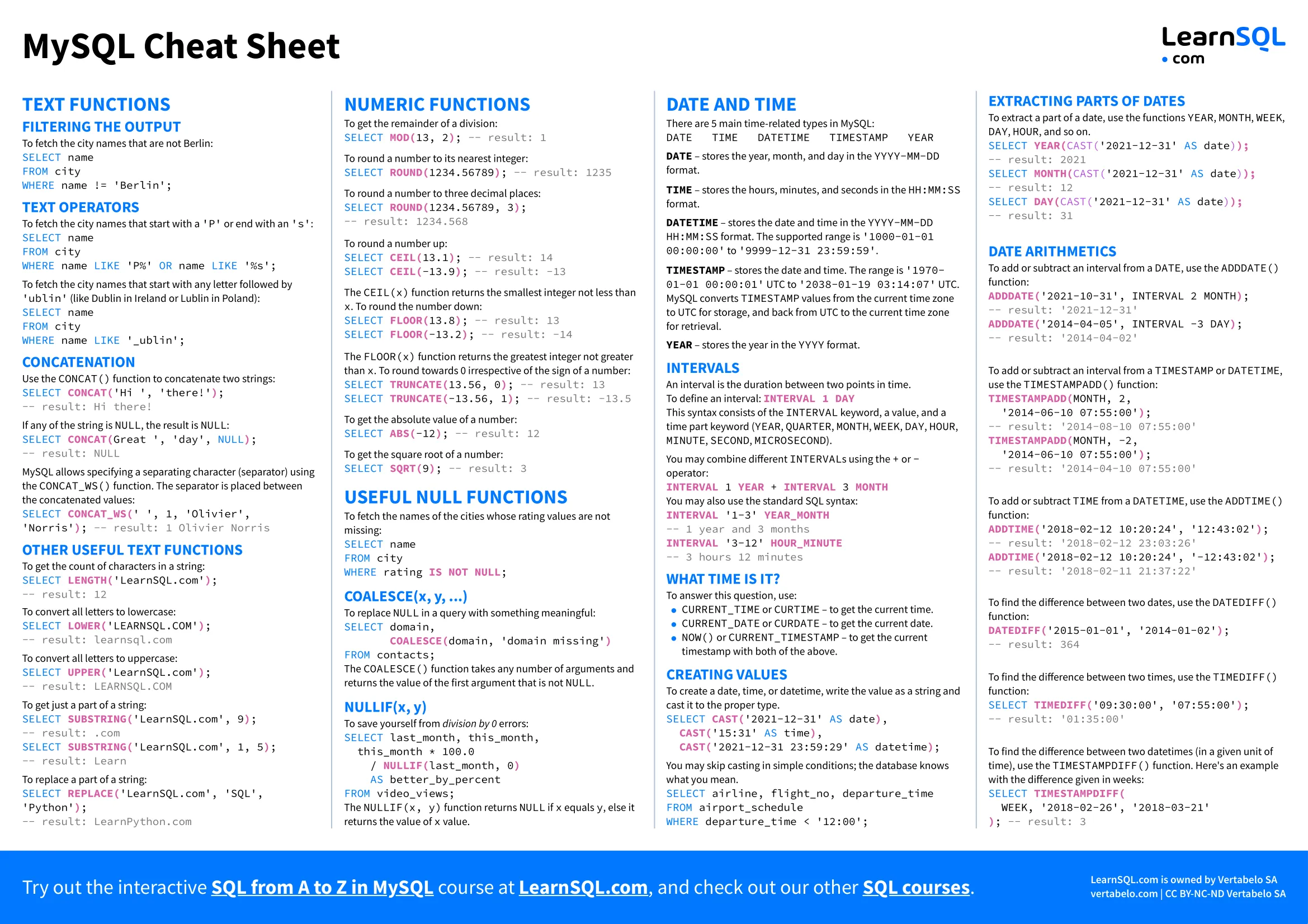

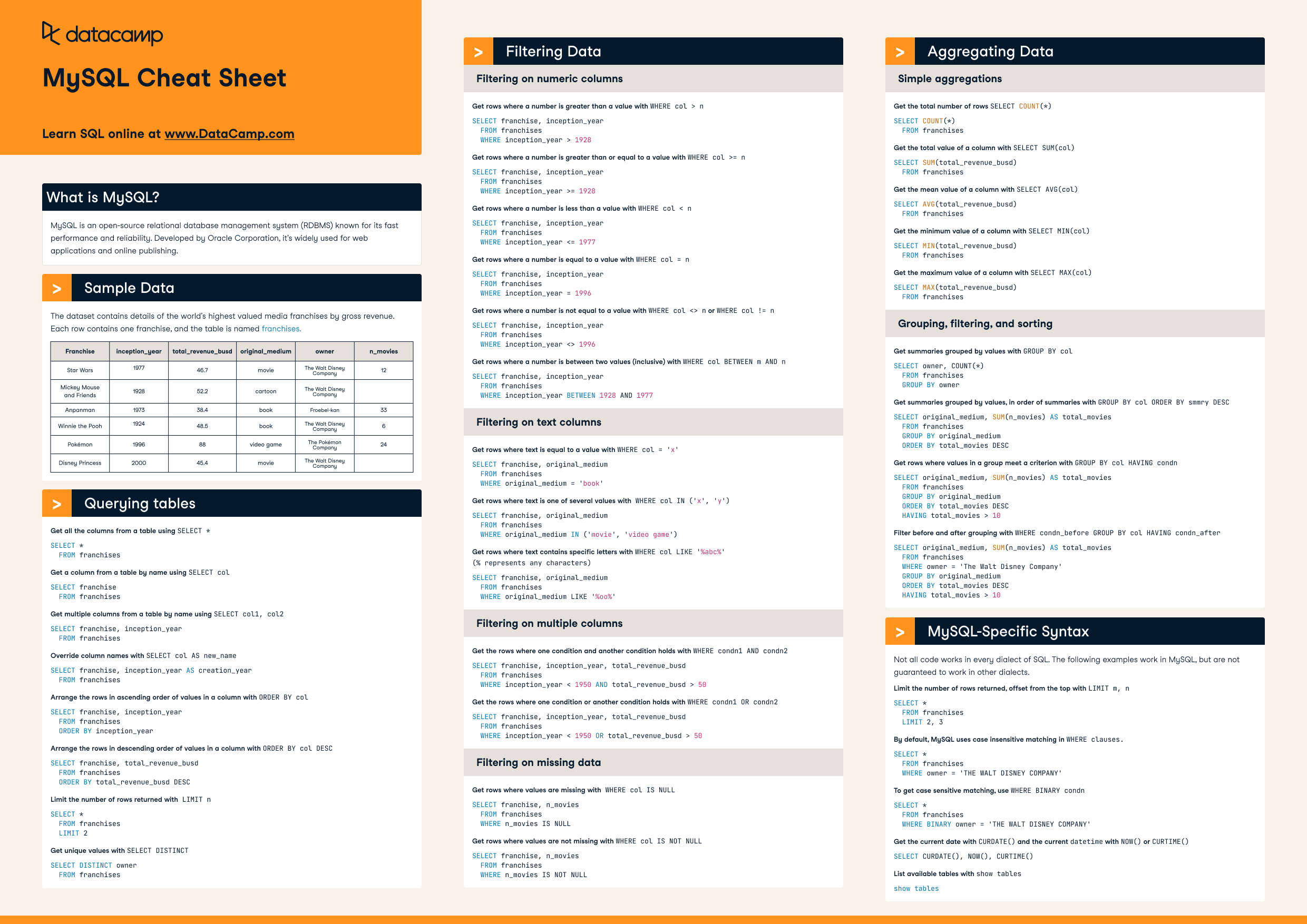
This cheat sheet provides an exhaustive overview of SQL (Structured Query Language), covering data types, Data Definition Language (DDL), Data Manipulation Language (DML), Data Query Language (DQL), Transaction Control Language (TCL), joins, subqueries, window functions, common table expressions (CTEs), and best practices. It aims to be a complete reference for writing and understanding SQL queries. This cheat sheet is designed to be generally applicable across different SQL database systems (e.g., MySQL, PostgreSQL, SQL Server, Oracle, SQLite), but notes specific differences where significant.
SQL Cheat Sheet Images
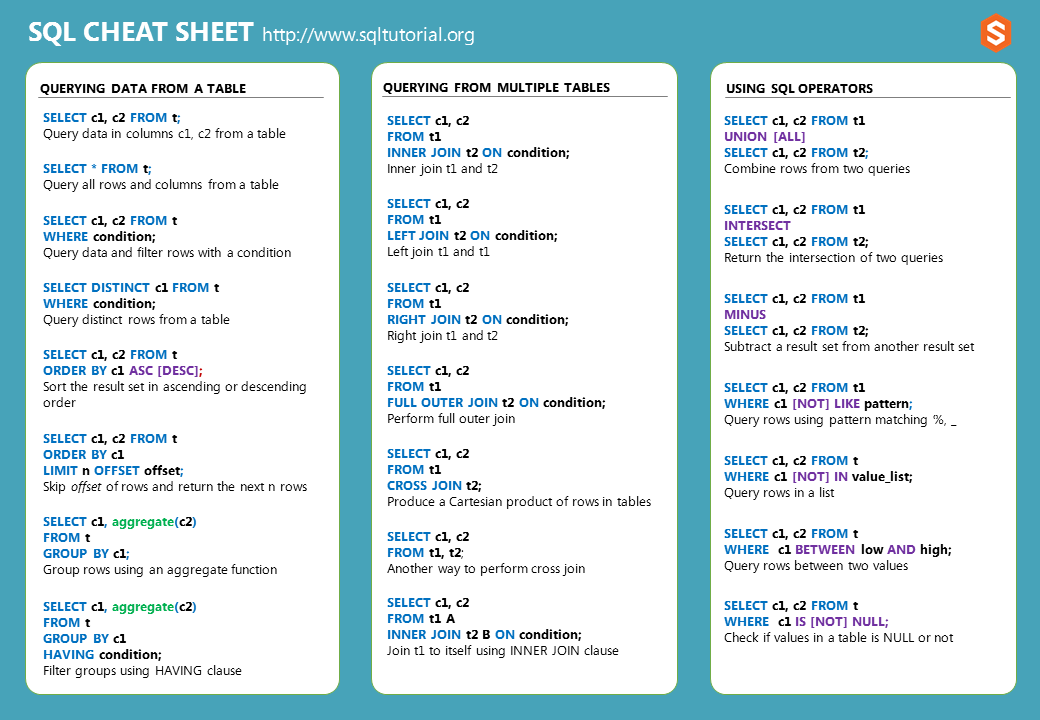
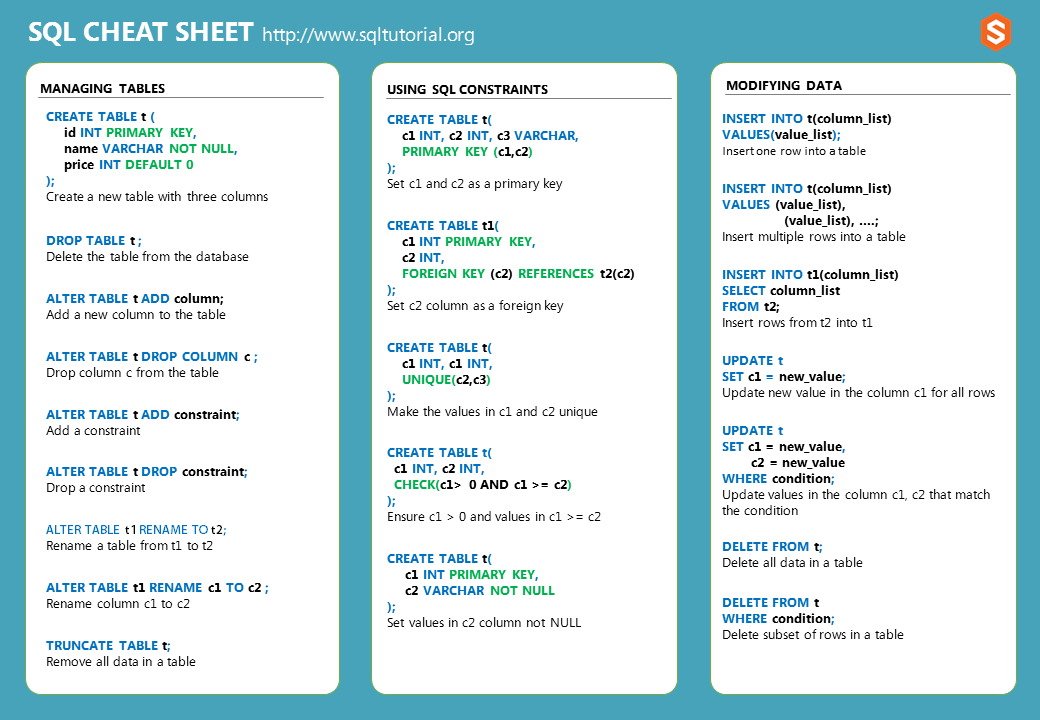
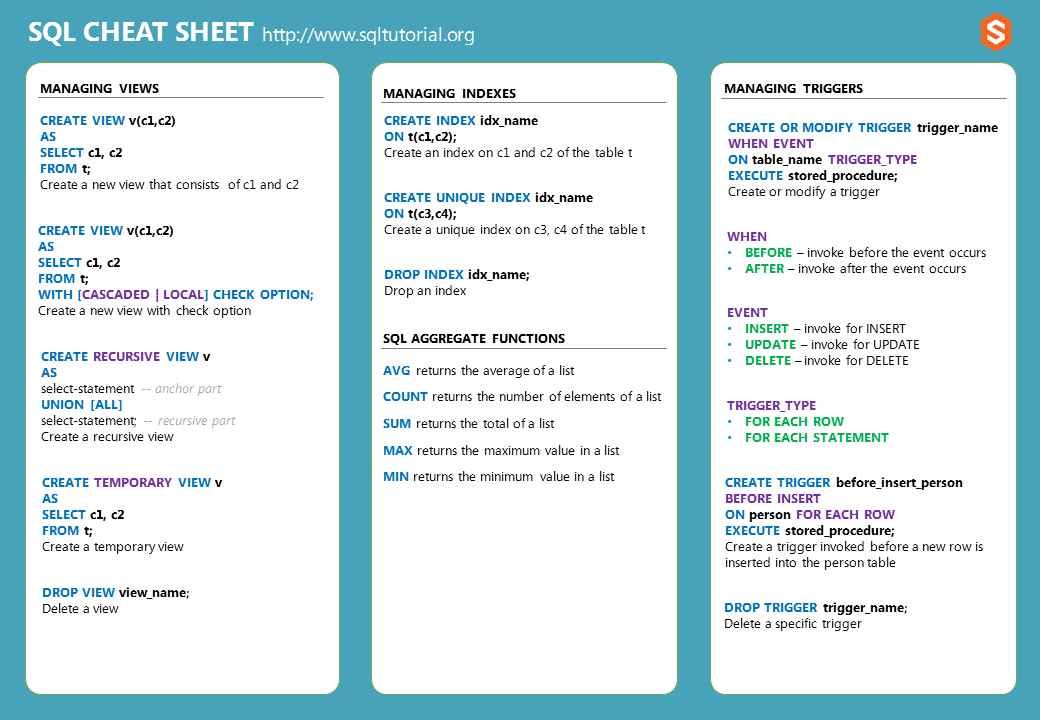
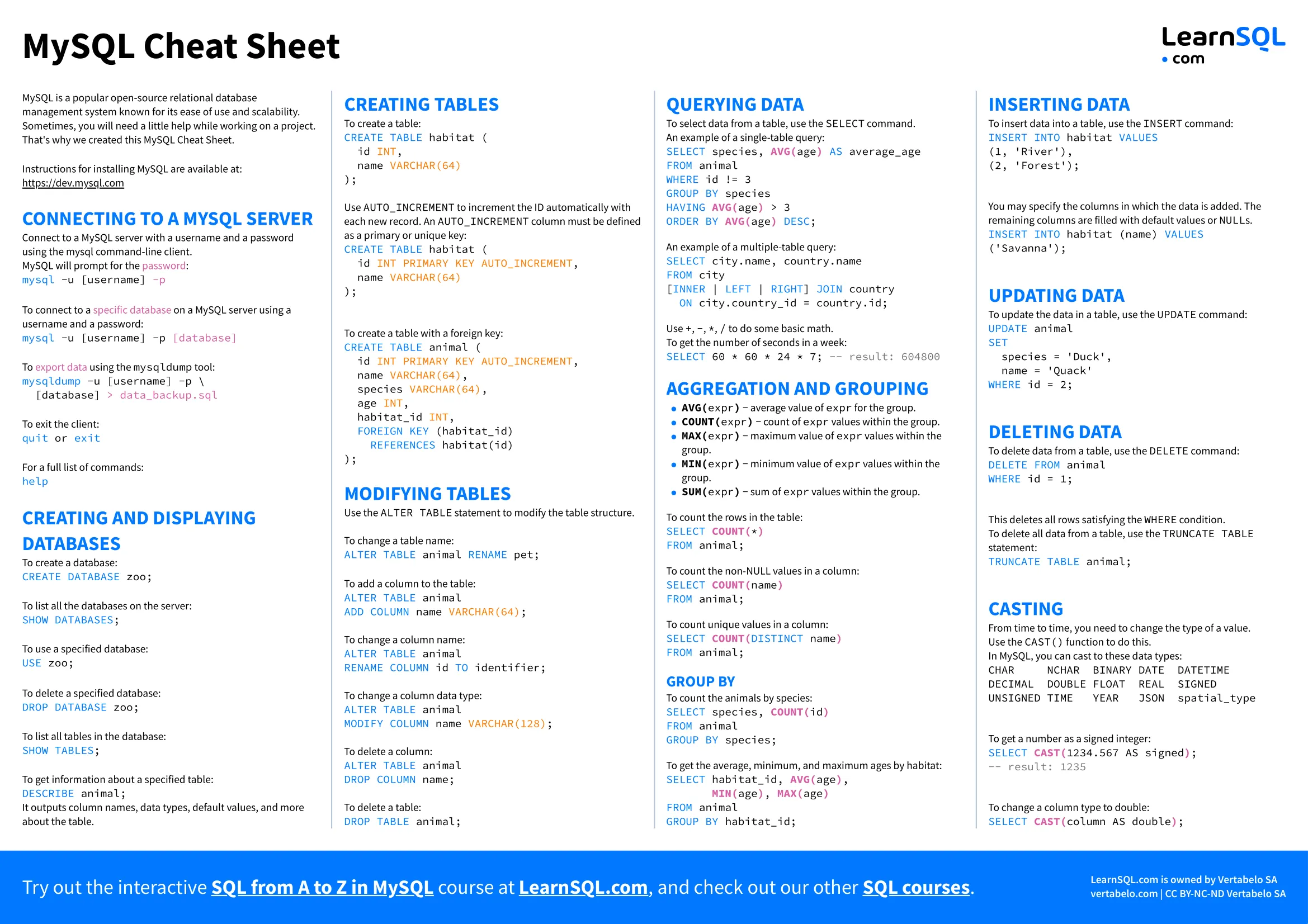
1.1 Data Types
1.1.1 Numeric
INT,INTEGER: Integer values.SMALLINT: Smaller integer values.BIGINT: Larger integer values.TINYINT: Very small integer values (MySQL, SQL Server).REAL: Single-precision floating-point numbers.FLOAT(p): Floating-point number with precisionp.DOUBLE PRECISION: Double-precision floating-point numbers.DECIMAL(p, s),NUMERIC(p, s): Fixed-point numbers with precisionpand scales.
1.1.2 String
CHAR(n): Fixed-length character string of lengthn.VARCHAR(n): Variable-length character string with a maximum length ofn.TEXT: Variable-length character string with no specified maximum length (or a very large maximum).NCHAR(n),NVARCHAR(n): Unicode character strings (for storing characters from different languages).
1.1.3 Date and Time
DATE: Date (YYYY-MM-DD).TIME: Time (HH:MI:SS).DATETIME,TIMESTAMP: Date and time.INTERVAL: A period of time.
1.1.4 Boolean
BOOLEAN: True or False. (Some databases, like MySQL, useTINYINT(1)to represent booleans).
1.1.5 Other
BLOB: Binary large object (for storing binary data).CLOB: Character large object (for storing large text data).JSON,JSONB: JSON data (supported by some databases like PostgreSQL).UUID: Universally Unique Identifier (supported by some databases like PostgreSQL).ENUM: Enumerated type (MySQL, PostgreSQL).ARRAY: Array type (PostgreSQL).
1.2 Data Definition Language (DDL)
1.2.1 CREATE TABLE
CREATE TABLE table_name (
    column1 datatype constraints,
    column2 datatype constraints,
    ...
    PRIMARY KEY (column1),
    FOREIGN KEY (column_fk) REFERENCES other_table(other_column)
);

-- Example
CREATE TABLE employees (
    id INT PRIMARY KEY,
    first_name VARCHAR(50),
    last_name VARCHAR(50),
    email VARCHAR(100) UNIQUE,
    hire_date DATE,
    salary DECIMAL(10, 2),
    department_id INT,
    FOREIGN KEY (department_id) REFERENCES departments(id)
);
1.2.2 ALTER TABLE
-- Add a column
ALTER TABLE table_name ADD COLUMN column_name datatype;

-- Drop a column
ALTER TABLE table_name DROP COLUMN column_name;

-- Modify a column
ALTER TABLE table_name MODIFY COLUMN column_name new_datatype;  -- MySQL, SQL Server
ALTER TABLE table_name ALTER COLUMN column_name TYPE new_datatype; -- PostgreSQL

-- Add a constraint
ALTER TABLE table_name ADD CONSTRAINT constraint_name constraint_definition;

-- Drop a constraint
ALTER TABLE table_name DROP CONSTRAINT constraint_name; -- Most databases
ALTER TABLE table_name DROP INDEX constraint_name; -- MySQL (for UNIQUE constraints)
1.2.3 DROP TABLE
DROP TABLE table_name;

-- Drop table only if it exists (avoids error if it doesn't)
DROP TABLE IF EXISTS table_name;
1.2.4 TRUNCATE TABLE
TRUNCATE TABLE table_name; -- Removes all rows, faster than DELETE
1.2.5 CREATE INDEX
CREATE INDEX index_name ON table_name (column1, column2, ...);

-- Unique index
CREATE UNIQUE INDEX index_name ON table_name (column1);
1.2.6 DROP INDEX
DROP INDEX index_name ON table_name; -- Most databases
ALTER TABLE table_name DROP INDEX index_name; -- MySQL
1.2.7 CREATE VIEW
CREATE VIEW view_name AS
SELECT column1, column2, ...
FROM table_name
WHERE condition;

-- Example
CREATE VIEW employee_names AS
SELECT first_name, last_name
FROM employees;
1.2.8 DROP VIEW
DROP VIEW view_name;
1.2.9 DATABASE Operations
-- Create a new database
CREATE DATABASE database_name;

-- Delete an existing database
DROP DATABASE database_name;

-- Delete an existing database only if it exists (avoids error if it doesn't)
DROP DATABASE IF EXISTS database_name;

-- Select a database to use (syntax varies, common in MySQL)
USE database_name;
1.3 Data Manipulation Language (DML)
1.3.1 INSERT
INSERT INTO table_name (column1, column2, ...) VALUES (value1, value2, ...);

-- Insert multiple rows
INSERT INTO table_name (column1, column2) VALUES
(value1a, value2a),
(value1b, value2b),
(value1c, value2c);

-- Insert from another table
INSERT INTO table_name (column1, column2)
SELECT column1, column2
FROM other_table
WHERE condition;
1.3.2 UPDATE
UPDATE table_name
SET column1 = value1, column2 = value2, ...
WHERE condition;

-- Example
UPDATE employees
SET salary = salary * 1.10
WHERE department_id = 1;
1.3.3 DELETE
DELETE FROM table_name WHERE condition;

-- Example
DELETE FROM employees WHERE id = 123;

-- Delete all rows (slower than TRUNCATE TABLE)
DELETE FROM table_name;
1.4 Data Query Language (DQL)
1.4.1 SQL Query Execution Flow
┌────────────────────────────────────────────────────────────────────┐
│                   SQL Query Execution Order                        │
└────────────────────────────────────────────────────────────────────┘

Written Order:                    Execution Order:
┌─────────────────┐               ┌─────────────────┐
│ 1. SELECT       │               │ 1. FROM         │
│ 2. FROM         │               │ 2. JOIN         │
│ 3. JOIN         │               │ 3. WHERE        │
│ 4. WHERE        │               │ 4. GROUP BY     │
│ 5. GROUP BY     │               │ 5. HAVING       │
│ 6. HAVING       │               │ 6. SELECT       │
│ 7. ORDER BY     │               │ 7. DISTINCT     │
│ 8. LIMIT/OFFSET │               │ 8. ORDER BY     │
└─────────────────┘               │ 9. LIMIT/OFFSET │
                                  └─────────────────┘

Detailed Execution Flow:

1. FROM & JOIN
   ┌──────────────────────────────────────┐
   │ Load tables and create Cartesian     │
   │ product, then apply JOIN conditions  │
   └────────────┬─────────────────────────┘
                ↓
2. WHERE
   ┌──────────────────────────────────────┐
   │ Filter rows based on conditions      │
   │ (before grouping)                    │
   └────────────┬─────────────────────────┘
                ↓
3. GROUP BY
   ┌──────────────────────────────────────┐
   │ Group rows by specified columns      │
   └────────────┬─────────────────────────┘
                ↓
4. HAVING
   ┌──────────────────────────────────────┐
   │ Filter groups based on aggregate     │
   │ conditions (after grouping)          │
   └────────────┬─────────────────────────┘
                ↓
5. SELECT
   ┌──────────────────────────────────────┐
   │ Evaluate expressions and select      │
   │ columns (aggregate functions here)   │
   └────────────┬─────────────────────────┘
                ↓
6. DISTINCT
   ┌──────────────────────────────────────┐
   │ Remove duplicate rows if specified   │
   └────────────┬─────────────────────────┘
                ↓
7. ORDER BY
   ┌──────────────────────────────────────┐
   │ Sort the result set                  │
   └────────────┬─────────────────────────┘
                ↓
8. LIMIT/OFFSET
   ┌──────────────────────────────────────┐
   │ Restrict number of rows returned     │
   └────────────┬─────────────────────────┘
                ↓
        ┌───────────────┐
        │ Final Result  │
        └───────────────┘

Example Query Breakdown:
SELECT department, AVG(salary) as avg_sal      -- Step 6: Select & aggregate
FROM employees                                  -- Step 1: Load table
WHERE hire_date > '2020-01-01'                 -- Step 3: Filter rows
GROUP BY department                             -- Step 4: Group by dept
HAVING AVG(salary) > 50000                     -- Step 5: Filter groups
ORDER BY avg_sal DESC                          -- Step 7: Sort results
LIMIT 10;                                      -- Step 8: Limit output

Key Points:
• WHERE filters individual rows (before aggregation)
• HAVING filters groups (after aggregation)
• Cannot use column aliases from SELECT in WHERE (not executed yet)
• Can use column aliases from SELECT in ORDER BY (executed after SELECT)
1.4.2 SELECT
SELECT column1, column2, ...
FROM table_name
WHERE condition
ORDER BY column1 ASC, column2 DESC
LIMIT n OFFSET m;

-- Select all columns
SELECT * FROM table_name;

-- Select with aliases
SELECT column1 AS alias1, column2 AS alias2 FROM table_name;

-- Select distinct values
SELECT DISTINCT column1 FROM table_name;
1.4.3 WHERE Clause
SELECT * FROM table_name WHERE column1 = value1 AND column2 > value2;
SELECT * FROM table_name WHERE column1 IN (value1, value2, value3);
SELECT * FROM table_name WHERE column1 BETWEEN value1 AND value2;
SELECT * FROM table_name WHERE column1 LIKE 'pattern%'; -- % is a wildcard
SELECT * FROM table_name WHERE column1 IS NULL;
SELECT * FROM table_name WHERE column1 IS NOT NULL;
1.4.4 ORDER BY Clause
SELECT * FROM table_name ORDER BY column1 ASC, column2 DESC;
1.4.5 LIMIT and OFFSET Clauses
SELECT * FROM table_name LIMIT 10;  -- Get the first 10 rows
SELECT * FROM table_name LIMIT 10 OFFSET 5;  -- Get 10 rows starting from row 6
1.4.6 Aggregate Functions
COUNT(): Counts rows.SUM(): Sums values.AVG(): Calculates the average.MIN(): Finds the minimum value.MAX(): Finds the maximum value.
SELECT COUNT(*) FROM table_name;
SELECT SUM(salary) FROM employees;
SELECT AVG(age) FROM employees;
SELECT MIN(hire_date) FROM employees;
SELECT MAX(salary) FROM employees;
1.4.7 GROUP BY Clause
SELECT department_id, AVG(salary) AS average_salary
FROM employees
GROUP BY department_id;
1.4.8 HAVING Clause
SELECT department_id, AVG(salary) AS average_salary
FROM employees
GROUP BY department_id
HAVING AVG(salary) > 50000;
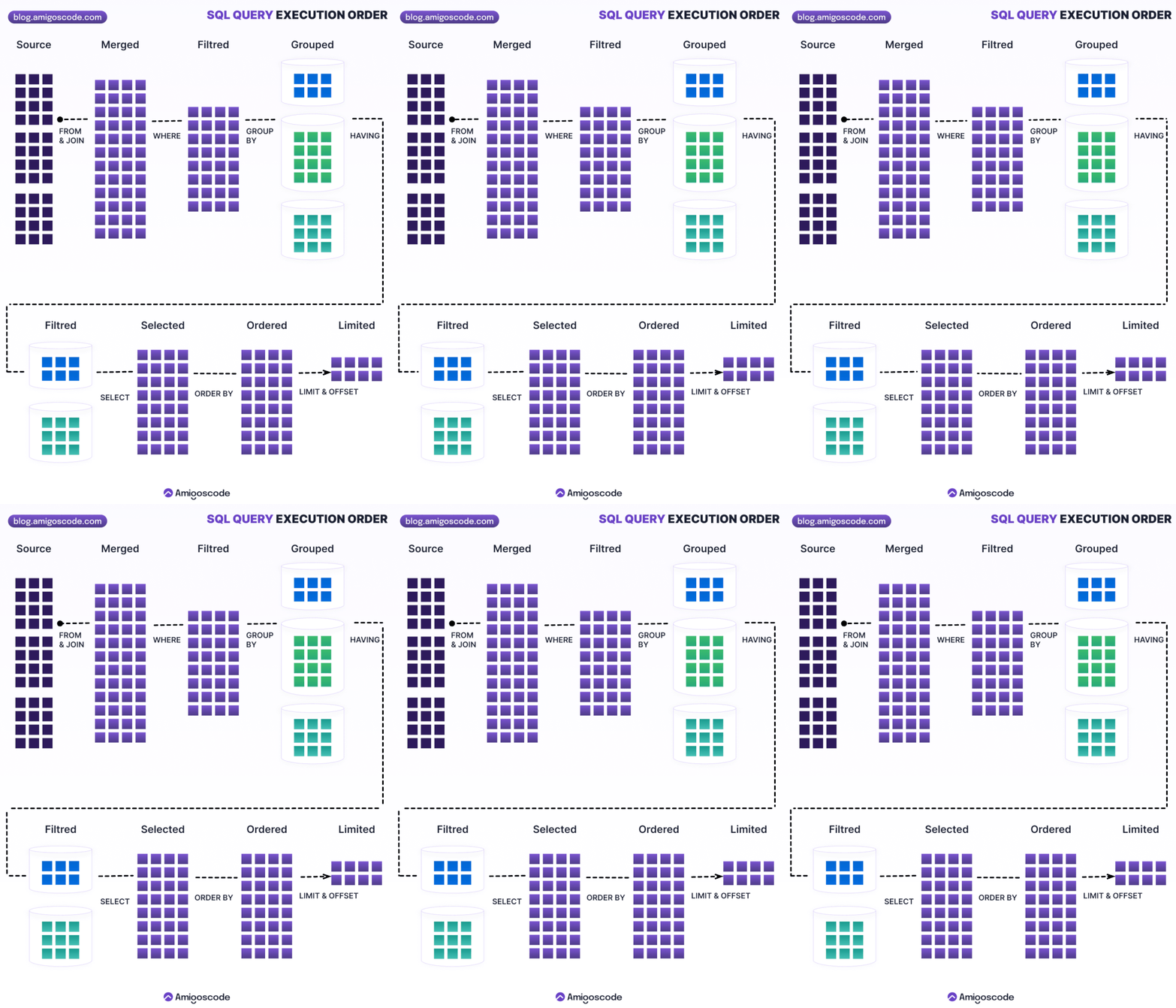
1.5 Order of execution
Order of execution
1.6 Joins
Visualise joins:

1.6.1 Join Types Visual Guide
Sample Tables:
employees (Table A)          departments (Table B)
┌────┬───────┬────────┐     ┌────┬────────────┐
│ id │ name  │ dept_id│     │ id │ dept_name  │
├────┼───────┼────────┤     ├────┼────────────┤
│ 1  │ Alice │   10   │     │ 10 │ Sales      │
│ 2  │ Bob   │   20   │     │ 20 │ Marketing  │
│ 3  │ Carol │   10   │     │ 30 │ IT         │
│ 4  │ David │  NULL  │     └────┴────────────┘
└────┴───────┴────────┘


INNER JOIN (Intersection only)
┌─────────┐
│    A    │
│  ┌───┐  │    Returns only matching rows from both tables
│  │ ∩ │  │    Result: Alice(Sales), Bob(Marketing), Carol(Sales)
│  └───┘  │    Excludes: David (no dept), IT dept (no employees)
│    B    │
└─────────┘
SQL: SELECT * FROM employees e INNER JOIN departments d ON e.dept_id = d.id;


LEFT JOIN / LEFT OUTER JOIN (All from A + matching from B)
┌─────────┐
│████ A ██│
│██┌───┐██│    Returns all rows from LEFT table + matching from right
│██│ ∩ │  │    Result: Alice(Sales), Bob(Marketing), Carol(Sales), David(NULL)
│██└───┘  │    David has NULL for dept_name
│    B    │
└─────────┘
SQL: SELECT * FROM employees e LEFT JOIN departments d ON e.dept_id = d.id;


RIGHT JOIN / RIGHT OUTER JOIN (All from B + matching from A)
┌─────────┐
│    A    │
│  ┌───┐██│    Returns all rows from RIGHT table + matching from left
│  │ ∩ │██│    Result: Alice(Sales), Bob(Marketing), Carol(Sales), NULL(IT)
│  └───┘██│    IT dept has NULL for employee name
│████ B ██│
└─────────┘
SQL: SELECT * FROM employees e RIGHT JOIN departments d ON e.dept_id = d.id;


FULL OUTER JOIN (All from both tables)
┌─────────┐
│████ A ██│
│██┌───┐██│    Returns all rows from both tables
│██│ ∩ │██│    Result: Alice(Sales), Bob(Marketing), Carol(Sales),
│██└───┘██│             David(NULL), NULL(IT)
│████ B ██│    Unmatched rows have NULL for missing side
└─────────┘
SQL: SELECT * FROM employees e FULL OUTER JOIN departments d ON e.dept_id = d.id;


LEFT JOIN - Exclusive (Only from A, not in B)
┌─────────┐
│████ A   │
│  ┌───┐  │    Returns rows from LEFT table with NO match in right
│  │   │  │    Result: David (no department assigned)
│  └───┘  │    Use: WHERE d.id IS NULL
│    B    │
└─────────┘
SQL: SELECT * FROM employees e LEFT JOIN departments d ON e.dept_id = d.id
     WHERE d.id IS NULL;


RIGHT JOIN - Exclusive (Only from B, not in A)
┌─────────┐
│    A    │
│  ┌───┐  │    Returns rows from RIGHT table with NO match in left
│  │   │  │    Result: IT department (no employees)
│  └───┘  │    Use: WHERE e.id IS NULL
│   ████ B│
└─────────┘
SQL: SELECT * FROM employees e RIGHT JOIN departments d ON e.dept_id = d.id
     WHERE e.id IS NULL;


CROSS JOIN (Cartesian Product)
┌─────────┐
│ A  ×  B │    Every row from A paired with every row from B
│         │    Result: 4 employees × 3 departments = 12 rows
│  All    │    Use: Generating combinations
│  Pairs  │
└─────────┘
SQL: SELECT * FROM employees CROSS JOIN departments;


SELF JOIN (Table joins with itself)
    employees e1          employees e2
    (employees)    JOIN   (managers)

    Used for hierarchical data (e.g., employee-manager relationships)
SQL: SELECT e1.name as employee, e2.name as manager
     FROM employees e1 JOIN employees e2 ON e1.manager_id = e2.id;
1.6.2 INNER JOIN
SELECT e.first_name, e.last_name, d.department_name
FROM employees e
INNER JOIN departments d ON e.department_id = d.id;
1.6.3 LEFT JOIN (LEFT OUTER JOIN)
SELECT e.first_name, e.last_name, d.department_name
FROM employees e
LEFT JOIN departments d ON e.department_id = d.id;
1.6.4 RIGHT JOIN (RIGHT OUTER JOIN)
SELECT e.first_name, e.last_name, d.department_name
FROM employees e
RIGHT JOIN departments d ON e.department_id = d.id;
1.6.5 FULL JOIN (FULL OUTER JOIN)
-- Full outer join is not supported by all databases (e.g., MySQL).
-- Use a combination of LEFT JOIN and RIGHT JOIN with UNION for equivalent functionality.
SELECT e.first_name, e.last_name, d.department_name
FROM employees e
FULL OUTER JOIN departments d ON e.department_id = d.id;

-- Equivalent in MySQL:
SELECT e.first_name, e.last_name, d.department_name
FROM employees e
LEFT JOIN departments d ON e.department_id = d.id
UNION
SELECT e.first_name, e.last_name, d.department_name
FROM employees e
RIGHT JOIN departments d ON e.department_id = d.id;
1.6.6 Self Join
SELECT e1.first_name, e2.first_name AS manager_name
FROM employees e1
JOIN employees e2 ON e1.manager_id = e2.id;
1.6.7 Cross Join
SELECT *
FROM table1
CROSS JOIN table2;
1.7 Set Operations
1.7.1 UNION
Combines the results of two SELECT statements and removes duplicate rows.
SELECT column1, column2 FROM table1
UNION
SELECT column1, column2 FROM table2;
1.7.2 UNION ALL
Combines the results of two SELECT statements, including duplicate rows.
SELECT column1, column2 FROM table1
UNION ALL
SELECT column1, column2 FROM table2;
1.7.3 INTERSECT
Returns the rows that are common to both SELECT statements.
SELECT column1, column2 FROM table1
INTERSECT
SELECT column1, column2 FROM table2;
1.7.4 EXCEPT
Returns the rows that are in the first SELECT statement but not in the second.
SELECT column1, column2 FROM table1
EXCEPT
SELECT column1, column2 FROM table2;
1.8 Subqueries
-- Subquery in WHERE clause
SELECT *
FROM employees
WHERE salary > (SELECT AVG(salary) FROM employees);

-- Subquery in SELECT clause
SELECT first_name, last_name,
       (SELECT COUNT(*) FROM orders WHERE orders.employee_id = employees.id) AS order_count
FROM employees;

-- Subquery in FROM clause
SELECT *
FROM (SELECT first_name, last_name, salary FROM employees) AS employee_salaries
WHERE salary > 60000;

-- Correlated subquery
SELECT e.first_name, e.last_name
FROM employees e
WHERE e.salary > (SELECT AVG(salary) FROM employees WHERE department_id = e.department_id);

-- EXISTS and NOT EXISTS
SELECT *
FROM employees e
WHERE EXISTS (SELECT 1 FROM orders o WHERE o.employee_id = e.id);
1.9 Common Table Expressions (CTEs)
WITH employee_summary AS (
    SELECT department_id, AVG(salary) AS avg_salary
    FROM employees
    GROUP BY department_id
)
SELECT d.department_name, es.avg_salary
FROM departments d
JOIN employee_summary es ON d.id = es.department_id;
1.10 Window Functions
1.10.1 Window Functions Visual Example
Sample Data:
┌─────┬────────────┬────────┬────────┐
│ id  │ department │ name   │ salary │
├─────┼────────────┼────────┼────────┤
│ 1   │ Sales      │ Alice  │ 70000  │
│ 2   │ Sales      │ Bob    │ 65000  │
│ 3   │ Sales      │ Carol  │ 80000  │
│ 4   │ IT         │ David  │ 90000  │
│ 5   │ IT         │ Eve    │ 85000  │
│ 6   │ IT         │ Frank  │ 75000  │
└─────┴────────────┴────────┴────────┘


ROW_NUMBER() OVER (PARTITION BY department ORDER BY salary DESC)
    → Assigns unique sequential number within each partition

┌────────────┬────────┬────────┬────────────┐
│ department │ name   │ salary │ row_number │
├────────────┼────────┼────────┼────────────┤
│ Sales      │ Carol  │ 80000  │     1      │  ← Highest in Sales
│ Sales      │ Alice  │ 70000  │     2      │
│ Sales      │ Bob    │ 65000  │     3      │  ← Lowest in Sales
├────────────┼────────┼────────┼────────────┤
│ IT         │ David  │ 90000  │     1      │  ← Highest in IT (resets)
│ IT         │ Eve    │ 85000  │     2      │
│ IT         │ Frank  │ 75000  │     3      │  ← Lowest in IT
└────────────┴────────┴────────┴────────────┘
Partitions reset numbering
Use: Get top N per group (WHERE row_number <= N)


RANK() vs DENSE_RANK() - Handling Ties

Sample with ties:
┌────────┬────────┐
│ name   │ score  │
├────────┼────────┤
│ Alice  │ 95     │
│ Bob    │ 90     │
│ Carol  │ 90     │  ← Tie
│ David  │ 85     │
│ Eve    │ 80     │
└────────┴────────┘

RANK() OVER (ORDER BY score DESC)  →  Gaps after ties
┌────────┬────────┬──────┐
│ name   │ score  │ rank │
├────────┼────────┼──────┤
│ Alice  │ 95     │  1   │
│ Bob    │ 90     │  2   │
│ Carol  │ 90     │  2   │  ← Tied for 2nd
│ David  │ 85     │  4   │  ← Gap! (skips 3)
│ Eve    │ 80     │  5   │
└────────┴────────┴──────┘

DENSE_RANK() OVER (ORDER BY score DESC)  →  No gaps
┌────────┬────────┬────────────┐
│ name   │ score  │ dense_rank │
├────────┼────────┼────────────┤
│ Alice  │ 95     │     1      │
│ Bob    │ 90     │     2      │
│ Carol  │ 90     │     2      │  ← Tied for 2nd
│ David  │ 85     │     3      │  ← No gap
│ Eve    │ 80     │     4      │
└────────┴────────┴────────────┘


LAG() and LEAD() - Access Adjacent Rows

LAG(salary, 1) OVER (ORDER BY id)  →  Previous row value
LEAD(salary, 1) OVER (ORDER BY id) →  Next row value

┌─────┬────────┬─────────────┬──────────────┬───────────────┐
│ id  │ salary │ lag(salary) │ lead(salary) │ salary_change │
├─────┼────────┼─────────────┼──────────────┼───────────────┤
│ 1   │ 70000  │    NULL     │   65000      │     N/A       │
│ 2   │ 65000  │   70000     │   80000      │   -5000       │
│ 3   │ 80000  │   65000     │   90000      │   +15000      │
│ 4   │ 90000  │   80000     │   85000      │   +10000      │
│ 5   │ 85000  │   90000     │   75000      │   -5000       │
│ 6   │ 75000  │   85000     │    NULL      │   -10000      │
└─────┴────────┴─────────────┴──────────────┴───────────────┘
        salary_change = salary - LAG(salary)
Use: Calculate differences, detect trends


Running Total with SUM() OVER()

SUM(salary) OVER (ORDER BY id ROWS BETWEEN UNBOUNDED PRECEDING AND CURRENT ROW)

┌─────┬────────┬────────┬───────────────┐
│ id  │ name   │ salary │ running_total │
├─────┼────────┼────────┼───────────────┤
│ 1   │ Alice  │ 70000  │    70000      │  ← 70000
│ 2   │ Bob    │ 65000  │   135000      │  ← 70000 + 65000
│ 3   │ Carol  │ 80000  │   215000      │  ← 135000 + 80000
│ 4   │ David  │ 90000  │   305000      │  ← 215000 + 90000
│ 5   │ Eve    │ 85000  │   390000      │  ← 305000 + 85000
│ 6   │ Frank  │ 75000  │   465000      │  ← 390000 + 75000
└─────┴────────┴────────┴───────────────┘
Use: Cumulative sums, YTD calculations


Moving Average (Last 3 rows)

AVG(salary) OVER (ORDER BY id ROWS BETWEEN 2 PRECEDING AND CURRENT ROW)

┌─────┬────────┬────────┬────────────────┐
│ id  │ name   │ salary │ moving_avg_3   │
├─────┼────────┼────────┼────────────────┤
│ 1   │ Alice  │ 70000  │   70000.00     │  ← Only 1 row: 70000/1
│ 2   │ Bob    │ 65000  │   67500.00     │  ← 2 rows: (70000+65000)/2
│ 3   │ Carol  │ 80000  │   71666.67     │  ← 3 rows: (70+65+80)/3
│ 4   │ David  │ 90000  │   78333.33     │  ← Last 3: (65+80+90)/3
│ 5   │ Eve    │ 85000  │   85000.00     │  ← Last 3: (80+90+85)/3
│ 6   │ Frank  │ 75000  │   83333.33     │  ← Last 3: (90+85+75)/3
└─────┴────────┴────────┴────────────────┘
Use: Smoothing data, trend analysis
1.10.2 Basic Window Function Syntax
SELECT
    first_name,
    last_name,
    salary,
    AVG(salary) OVER (PARTITION BY department_id) AS avg_salary_by_department,
    RANK() OVER (PARTITION BY department_id ORDER BY salary DESC) AS salary_rank
FROM employees;
Common Window Functions:
ROW_NUMBER(): Assigns a unique sequential integer to each row within its partition.RANK(): Assigns a rank to each row within its partition, with gaps in rank values.DENSE_RANK(): Assigns a rank to each row within its partition, without gaps.NTILE(n): Divides the rows within a partition intongroups.LAG(column, offset, default): Accesses data from a previous row.LEAD(column, offset, default): Accesses data from a subsequent row.FIRST_VALUE(column): Returns the first value in a window frame.LAST_VALUE(column): Returns the last value in a window frame.NTH_VALUE(column, n): Returns the nth value in a window frame.
1.11 Transaction Control Language (TCL)
1.11.1 Transaction Flow
┌────────────────────────────────────────────────────────────────────┐
│                       Transaction Lifecycle                        │
└────────────────────────────────────────────────────────────────────┘

Normal Transaction (Success Path):
┌──────────────────┐
│ Auto-commit mode │  Default: Each statement commits immediately
└────────┬─────────┘
         │
         ↓
    ┌─────────────────────┐
    │ BEGIN TRANSACTION   │  Start explicit transaction
    └──────────┬──────────┘
               │
               ↓
    ┌──────────────────────────┐
    │ UPDATE accounts          │  Changes held in memory
    │ SET balance = balance-100│  Not yet visible to other
    │ WHERE id = 1;            │  transactions
    └──────────┬───────────────┘
               │
               ↓
    ┌──────────────────────────┐
    │ UPDATE accounts          │  Multiple operations can be
    │ SET balance = balance+100│  grouped together
    │ WHERE id = 2;            │
    └──────────┬───────────────┘
               │
               ↓
    ┌──────────────────────────┐
    │ COMMIT                   │  ✅ All changes saved permanently
    └──────────────────────────┘  Other transactions can now see changes


Rollback Transaction (Error Path):
    ┌─────────────────────┐
    │ BEGIN TRANSACTION   │
    └──────────┬──────────┘
               │
               ↓
    ┌──────────────────────────┐
    │ UPDATE accounts          │  First operation succeeds
    │ SET balance = balance-100│
    │ WHERE id = 1;            │
    └──────────┬───────────────┘
               │
               ↓
    ┌──────────────────────────┐
    │ UPDATE accounts          │  ❌ Error occurs!
    │ SET balance = balance+100│  (e.g., constraint violation,
    │ WHERE id = 999;          │   network error, etc.)
    └──────────┬───────────────┘
               │
               ↓
    ┌──────────────────────────┐
    │ ROLLBACK                 │  🔄 All changes discarded
    └──────────────────────────┘  Database returns to state before BEGIN


Savepoint Transaction (Partial Rollback):
    ┌─────────────────────┐
    │ BEGIN TRANSACTION   │
    └──────────┬──────────┘
               │
               ↓
    ┌──────────────────────────┐
    │ INSERT INTO orders(...)  │  First operation
    │ VALUES (...);            │
    └──────────┬───────────────┘
               │
               ↓
    ┌──────────────────────────┐
    │ SAVEPOINT sp1            │  📌 Mark this point
    └──────────┬───────────────┘
               │
               ↓
    ┌──────────────────────────┐
    │ INSERT INTO order_items  │  Second operation
    │ VALUES (...);            │
    └──────────┬───────────────┘
               │
               ↓
    ┌──────────────────────────┐
    │ SAVEPOINT sp2            │  📌 Mark another point
    └──────────┬───────────────┘
               │
               ↓
    ┌──────────────────────────┐
    │ UPDATE inventory         │  ❌ Error occurs
    │ SET quantity = -5;       │  (invalid negative qty)
    └──────────┬───────────────┘
               │
               ↓
    ┌──────────────────────────┐
    │ ROLLBACK TO sp2          │  🔄 Undo only after sp2
    └──────────┬───────────────┘  (orders and order_items remain)
               │
               ↓
    ┌──────────────────────────┐
    │ UPDATE inventory         │  Retry with correct values
    │ SET quantity = quantity-5│
    └──────────┬───────────────┘
               │
               ↓
    ┌──────────────────────────┐
    │ COMMIT                   │  ✅ Save all changes
    └──────────────────────────┘


Transaction Isolation Levels:
┌────────────────────────┬─────────────┬─────────────┬─────────────┐
│ Isolation Level        │ Dirty Read  │ Non-repeat  │ Phantom     │
│                        │             │ Read        │ Read        │
├────────────────────────┼─────────────┼─────────────┼─────────────┤
│ READ UNCOMMITTED       │   Possible  │   Possible  │   Possible  │
│ READ COMMITTED         │   Prevented │   Possible  │   Possible  │
│ REPEATABLE READ        │   Prevented │   Prevented │   Possible  │
│ SERIALIZABLE           │   Prevented │   Prevented │   Prevented │
└────────────────────────┴─────────────┴─────────────┴─────────────┘

ACID Properties:
• Atomicity:    All or nothing - entire transaction succeeds or fails
• Consistency:  Database remains in valid state before/after transaction
• Isolation:    Concurrent transactions don't interfere with each other
• Durability:   Committed changes survive system crashes
1.11.2 START TRANSACTION (or BEGIN)
START TRANSACTION;
-- or
BEGIN;
1.11.3 COMMIT
COMMIT; -- Save changes
1.11.4 ROLLBACK
ROLLBACK; -- Discard changes
1.11.5 SAVEPOINT
SAVEPOINT savepoint_name;
1.11.6 ROLLBACK TO SAVEPOINT
ROLLBACK TO SAVEPOINT savepoint_name;
1.11.7 SET TRANSACTION
SET TRANSACTION ISOLATION LEVEL READ COMMITTED; -- Example
1.12 String Functions
CONCAT(str1, str2, ...): Concatenates strings.LENGTH(str)orLEN(str): Returns the length of a string.SUBSTRING(str, start, length)orSUBSTR(str, start, length): Extracts a substring.UPPER(str)orUCASE(str): Converts a string to uppercase.LOWER(str)orLCASE(str): Converts a string to lowercase.TRIM(str): Removes leading and trailing whitespace.LTRIM(str): Removes leading whitespace.RTRIM(str): Removes trailing whitespace.REPLACE(str, old, new): Replaces occurrences of a substring.INSTR(str, substr)orPOSITION(substr IN str): Returns the position of a substring.LEFT(str, length): Returns the leftmost characters of a string.RIGHT(str, length): Returns the rightmost characters of a string.LPAD(str, length, padstr): Left-pads a string.RPAD(str, length, padstr): Right-pads a string.
1.13 Date and Time Functions
NOW(),CURRENT_TIMESTAMP: Returns the current date and time.CURDATE(),CURRENT_DATE: Returns the current date.CURTIME(),CURRENT_TIME: Returns the current time.DATE(expression): Extracts the date part of a date or datetime expression.TIME(expression): Extracts the time part of a time or datetime expression.YEAR(date),MONTH(date),DAY(date): Extracts the year, month, or day from a date.HOUR(time),MINUTE(time),SECOND(time): Extracts the hour, minute, or second from a time.EXTRACT(unit FROM datetime): Extracts a specific unit (e.g.,YEAR,MONTH,DAY,HOUR,MINUTE,SECOND) from a date or timestamp.DATE_ADD(date, INTERVAL expr unit),DATE_SUB(date, INTERVAL expr unit): Adds or subtracts a time interval (units:DAY,WEEK,MONTH,YEAR, etc.).DATEDIFF(date1, date2): Returns the difference between two dates (result unit varies by database, often days).TIMESTAMPDIFF(unit, datetime1, datetime2): Returns the difference between two datetimes in a specified unit (units:MINUTE,HOUR,SECOND,DAY,MONTH,YEAR).DATE_FORMAT(date, format): Formats a date according to the specified format string (format codes vary by database).DAYOFWEEK(date): Returns the day of the week as a number (e.g., 1=Sunday, 2=Monday...).WEEKOFYEAR(date): Returns the week number of the year.QUARTER(date): Returns the quarter of the year (1-4).WEEK(date): Returns the week number (behavior can vary based on mode/database).
-- Get current date, time, timestamp
SELECT CURRENT_DATE();
SELECT CURRENT_TIME();
SELECT CURRENT_TIMESTAMP();

-- Extract parts of a date/time
SELECT DATE(CURRENT_TIMESTAMP());
SELECT EXTRACT(YEAR FROM CURRENT_TIMESTAMP());
SELECT EXTRACT(MONTH FROM CURRENT_TIMESTAMP());
SELECT EXTRACT(DAY FROM CURRENT_TIMESTAMP());
SELECT EXTRACT(HOUR FROM CURRENT_TIMESTAMP());
SELECT EXTRACT(MINUTE FROM CURRENT_TIMESTAMP());
SELECT EXTRACT(SECOND FROM CURRENT_TIMESTAMP());

-- Get week/day information
SELECT DAYOFWEEK(CURRENT_TIMESTAMP()); -- 1=Sunday, 2=Monday, ..., 7=Saturday (common convention)
SELECT WEEKOFYEAR(CURRENT_TIMESTAMP());
SELECT QUARTER(CURRENT_DATE());
SELECT WEEK(CURRENT_DATE()); -- Behavior might depend on mode

-- Date arithmetic
SELECT DATE_ADD(CURRENT_DATE(), INTERVAL 4 DAY) AS four_days_from_today;
SELECT DATE_ADD(CURRENT_DATE(), INTERVAL 1 DAY);
SELECT DATE_ADD(CURRENT_DATE(), INTERVAL 2 WEEK);
SELECT DATE_ADD(CURRENT_DATE(), INTERVAL 3 MONTH);
SELECT DATE_ADD(CURRENT_DATE(), INTERVAL 4 YEAR);

-- Date differences
SELECT DATEDIFF(CURRENT_DATE(), '2023-01-01'); -- Difference in days (example)
SELECT TIMESTAMPDIFF(HOUR, '2023-01-01 10:00:00', CURRENT_TIMESTAMP()); -- Difference in hours

-- Formatting
SELECT DATE_FORMAT(CURRENT_DATE(), '%Y-%m-%d'); -- Common format codes
1.14 Conditional Expressions
1.14.1 CASE
SELECT
    first_name,
    last_name,
    CASE
        WHEN salary > 80000 THEN 'High'
        WHEN salary > 50000 THEN 'Medium'
        ELSE 'Low'
    END AS salary_level
FROM employees;
1.14.2 IF (MySQL, SQL Server)
SELECT first_name, last_name, IF(salary > 50000, 'High', 'Low') AS salary_level
FROM employees;
1.14.3 COALESCE
SELECT COALESCE(column1, column2, 'Default Value') AS result FROM table_name;
1.14.4 NULLIF
SELECT NULLIF(column1, value) AS result FROM table_name;
1.15 User-Defined Functions (UDFs)
(Syntax varies significantly between database systems)
Example (MySQL):
DELIMITER //
CREATE FUNCTION my_function(param1 INT, param2 VARCHAR(255))
RETURNS INT
DETERMINISTIC
BEGIN
    -- Function logic
    RETURN result;
END //
DELIMITER ;
1.16 Stored Procedures
(Syntax varies significantly between database systems)
Example (MySQL):
DELIMITER //
CREATE PROCEDURE my_procedure(IN param1 INT, OUT param2 VARCHAR(255))
BEGIN
    -- Procedure logic
    SELECT column1 INTO param2 FROM table_name WHERE column2 = param1;
END //
DELIMITER ;
1.17 Triggers
(Syntax varies significantly between database systems)
Example (MySQL):
DELIMITER //
CREATE TRIGGER my_trigger
BEFORE INSERT ON employees
FOR EACH ROW
BEGIN
    -- Trigger logic
    SET NEW.created_at = NOW();
END //
DELIMITER ;
1.18 Indexes
1.18.1 Creating Indexes
CREATE INDEX idx_lastname ON employees (last_name);
CREATE UNIQUE INDEX idx_email ON employees (email);
CREATE INDEX idx_lastname_firstname ON employees (last_name, first_name);
1.18.2 Dropping Indexes
DROP INDEX idx_lastname ON employees; -- Standard SQL
ALTER TABLE employees DROP INDEX idx_lastname; -- MySQL
1.19 Views
1.19.1 Creating Views
CREATE VIEW high_salary_employees AS
SELECT employee_id, first_name, last_name, salary
FROM employees
WHERE salary > 80000;
1.19.2 Dropping Views
DROP VIEW high_salary_employees;
1.20 Transactions
START TRANSACTION; -- or BEGIN;

-- SQL statements

COMMIT; -- Save changes
-- or
ROLLBACK; -- Discard changes
1.21 Security
- User Management:
CREATE USER,ALTER USER,DROP USER,GRANT,REVOKE. - Permissions: Grant specific privileges (e.g.,
SELECT,INSERT,UPDATE,DELETE) to users or roles on database objects. - Roles: Create roles to group privileges and assign them to users.
- Views: Use views to restrict access to sensitive data.
- Stored Procedures: Use stored procedures to encapsulate logic and control access.
- Encryption: Encrypt sensitive data at rest and in transit.
- Auditing: Enable auditing to track database activity.
- SQL Injection Prevention: Use parameterized queries or prepared statements to prevent SQL injection attacks.
1.22 Common Patterns
1.22.1 Pagination
Method 1: LIMIT/OFFSET (Simple but slow for large offsets)
-- Page 1 (rows 1-10)
SELECT * FROM products
ORDER BY id
LIMIT 10 OFFSET 0;

-- Page 2 (rows 11-20)
SELECT * FROM products
ORDER BY id
LIMIT 10 OFFSET 10;

-- Page N (calculate offset)
-- offset = (page_number - 1) * page_size
SELECT * FROM products
ORDER BY id
LIMIT 10 OFFSET 20;  -- Page 3
Method 2: Keyset Pagination (Faster for large datasets)
-- First page
SELECT * FROM products
ORDER BY id
LIMIT 10;

-- Next page (using last id from previous page)
SELECT * FROM products
WHERE id > 10  -- Last id from previous page
ORDER BY id
LIMIT 10;

-- Previous page
SELECT * FROM products
WHERE id < 50  -- First id from current page
ORDER BY id DESC
LIMIT 10;
Method 3: ROW_NUMBER() for Complex Pagination
WITH numbered_products AS (
    SELECT *,
           ROW_NUMBER() OVER (ORDER BY id) AS row_num
    FROM products
)
SELECT * FROM numbered_products
WHERE row_num BETWEEN 11 AND 20;  -- Page 2
1.22.2 Upsert (Insert or Update)
MySQL: INSERT ... ON DUPLICATE KEY UPDATE
INSERT INTO users (id, name, email, login_count)
VALUES (1, 'Alice', '[email protected]', 1)
ON DUPLICATE KEY UPDATE
    name = VALUES(name),
    email = VALUES(email),
    login_count = login_count + 1;
PostgreSQL: INSERT ... ON CONFLICT
INSERT INTO users (id, name, email, login_count)
VALUES (1, 'Alice', '[email protected]', 1)
ON CONFLICT (id) DO UPDATE SET
    name = EXCLUDED.name,
    email = EXCLUDED.email,
    login_count = users.login_count + 1;
Standard SQL: MERGE (SQL Server, Oracle)
MERGE INTO users AS target
USING (SELECT 1 AS id, 'Alice' AS name, '[email protected]' AS email) AS source
ON target.id = source.id
WHEN MATCHED THEN
    UPDATE SET name = source.name, email = source.email
WHEN NOT MATCHED THEN
    INSERT (id, name, email) VALUES (source.id, source.name, source.email);
1.22.3 Recursive CTEs (Hierarchical Data)
Employee Hierarchy (Manager-Employee relationship)
WITH RECURSIVE employee_hierarchy AS (
    -- Anchor member: Start with top-level employees (no manager)
    SELECT id, name, manager_id, 1 AS level, name AS path
    FROM employees
    WHERE manager_id IS NULL

    UNION ALL

    -- Recursive member: Join with employees table
    SELECT e.id, e.name, e.manager_id,
           eh.level + 1,
           eh.path || ' > ' || e.name
    FROM employees e
    INNER JOIN employee_hierarchy eh ON e.manager_id = eh.id
)
SELECT * FROM employee_hierarchy
ORDER BY level, name;
Category Tree (Parent-Child relationship)
WITH RECURSIVE category_tree AS (
    -- Root categories
    SELECT id, name, parent_id, 0 AS depth
    FROM categories
    WHERE parent_id IS NULL

    UNION ALL

    -- Child categories
    SELECT c.id, c.name, c.parent_id, ct.depth + 1
    FROM categories c
    INNER JOIN category_tree ct ON c.parent_id = ct.id
    WHERE ct.depth < 10  -- Prevent infinite loops
)
SELECT * FROM category_tree;
1.22.4 Top N Per Group
Method 1: Using Window Functions (ROW_NUMBER)
WITH ranked_employees AS (
    SELECT *,
           ROW_NUMBER() OVER (PARTITION BY department_id ORDER BY salary DESC) AS rank
    FROM employees
)
SELECT department_id, name, salary
FROM ranked_employees
WHERE rank <= 3;  -- Top 3 highest paid per department
Method 2: Using Correlated Subquery
SELECT e1.*
FROM employees e1
WHERE (
    SELECT COUNT(*)
    FROM employees e2
    WHERE e2.department_id = e1.department_id
      AND e2.salary >= e1.salary
) <= 3;
1.22.5 Finding Duplicates
Find Duplicate Rows
-- Count duplicates
SELECT email, COUNT(*) as count
FROM users
GROUP BY email
HAVING COUNT(*) > 1;

-- Get all duplicate records
SELECT u.*
FROM users u
INNER JOIN (
    SELECT email
    FROM users
    GROUP BY email
    HAVING COUNT(*) > 1
) dupes ON u.email = dupes.email
ORDER BY u.email, u.id;
Delete Duplicates (Keep First Occurrence)
-- Using ROW_NUMBER (PostgreSQL, SQL Server, MySQL 8.0+)
DELETE FROM users
WHERE id IN (
    SELECT id
    FROM (
        SELECT id,
               ROW_NUMBER() OVER (PARTITION BY email ORDER BY id) AS rn
        FROM users
    ) t
    WHERE rn > 1
);

-- Using Self-Join (Works in all databases)
DELETE u1
FROM users u1
INNER JOIN users u2
WHERE u1.email = u2.email
  AND u1.id > u2.id;
1.22.6 Pivot and Unpivot
Pivot: Rows to Columns
-- Convert quarterly sales data from rows to columns
SELECT
    product_id,
    MAX(CASE WHEN quarter = 'Q1' THEN sales END) AS Q1_sales,
    MAX(CASE WHEN quarter = 'Q2' THEN sales END) AS Q2_sales,
    MAX(CASE WHEN quarter = 'Q3' THEN sales END) AS Q3_sales,
    MAX(CASE WHEN quarter = 'Q4' THEN sales END) AS Q4_sales
FROM quarterly_sales
GROUP BY product_id;

-- Or using PIVOT (SQL Server, Oracle)
SELECT *
FROM (SELECT product_id, quarter, sales FROM quarterly_sales)
PIVOT (
    SUM(sales)
    FOR quarter IN ([Q1], [Q2], [Q3], [Q4])
) AS pivoted;
Unpivot: Columns to Rows
-- Convert columnar quarterly data to rows
SELECT product_id, 'Q1' AS quarter, Q1_sales AS sales FROM products WHERE Q1_sales IS NOT NULL
UNION ALL
SELECT product_id, 'Q2', Q2_sales FROM products WHERE Q2_sales IS NOT NULL
UNION ALL
SELECT product_id, 'Q3', Q3_sales FROM products WHERE Q3_sales IS NOT NULL
UNION ALL
SELECT product_id, 'Q4', Q4_sales FROM products WHERE Q4_sales IS NOT NULL;
1.22.7 Running Totals and Moving Averages
Running Total
SELECT
    order_date,
    daily_revenue,
    SUM(daily_revenue) OVER (
        ORDER BY order_date
        ROWS BETWEEN UNBOUNDED PRECEDING AND CURRENT ROW
    ) AS cumulative_revenue
FROM daily_sales;
Moving Average (Last 7 days)
SELECT
    order_date,
    daily_revenue,
    AVG(daily_revenue) OVER (
        ORDER BY order_date
        ROWS BETWEEN 6 PRECEDING AND CURRENT ROW
    ) AS moving_avg_7day
FROM daily_sales;
1.22.8 Gap and Island Problem
Find Consecutive Sequences
-- Find consecutive date ranges
WITH grouped_dates AS (
    SELECT
        date,
        ROW_NUMBER() OVER (ORDER BY date) AS rn,
        DATEADD(DAY, -ROW_NUMBER() OVER (ORDER BY date), date) AS grp
    FROM attendance
)
SELECT
    MIN(date) AS start_date,
    MAX(date) AS end_date,
    COUNT(*) AS consecutive_days
FROM grouped_dates
GROUP BY grp
ORDER BY start_date;
1.22.9 Generate Series (Number/Date Ranges)
PostgreSQL:
-- Generate numbers 1 to 100
SELECT generate_series(1, 100) AS n;

-- Generate date range
SELECT generate_series(
    '2024-01-01'::date,
    '2024-12-31'::date,
    '1 day'::interval
) AS date;
MySQL 8.0+ (Using Recursive CTE):
-- Generate numbers 1 to 100
WITH RECURSIVE numbers AS (
    SELECT 1 AS n
    UNION ALL
    SELECT n + 1 FROM numbers WHERE n < 100
)
SELECT n FROM numbers;

-- Generate date range
WITH RECURSIVE dates AS (
    SELECT '2024-01-01' AS date
    UNION ALL
    SELECT DATE_ADD(date, INTERVAL 1 DAY)
    FROM dates
    WHERE date < '2024-12-31'
)
SELECT date FROM dates;
1.23 Best Practices
- Use meaningful names: Choose descriptive names for tables, columns, and other database objects.
- Normalize your database: Design your database schema to reduce data redundancy and improve data integrity.
- Use appropriate data types: Select data types that are appropriate for the data you are storing.
- Use indexes: Create indexes on columns that are frequently used in
WHEREclauses andJOINconditions. - Optimize your queries: Write efficient queries that minimize the amount of data that needs to be processed.
- Use transactions: Use transactions to ensure data consistency and integrity.
- Back up your database: Regularly back up your database to prevent data loss.
- Secure your database: Implement appropriate security measures to protect your data.
- Use comments: Add comments to your SQL code to explain what it does.
- Use a consistent coding style: Follow a consistent coding style to make your code easier to read and maintain.
- Test your queries: Thoroughly test your queries to ensure they are working as expected.
- Use a database management tool: Use a tool like MySQL Workbench, pgAdmin, SQL Server Management Studio, or Dbeaver to manage your database.
- Use version control: Use a version control system (e.g., Git) to track changes to your database schema and code.
- Use an ORM (Object-Relational Mapper): Consider using an ORM (e.g., SQLAlchemy, Django ORM) to simplify database interactions.
- Avoid
SELECT *: Explicitly list the columns you need to retrieve. - Use
EXISTSinstead ofCOUNT(*)when checking for existence:EXISTSis often more efficient. - Use
JOINinstead of subqueries when possible: Joins are generally faster. - Use
UNION ALLinstead ofUNIONwhen you don't need to remove duplicates:UNION ALLis faster. - Use
CASEexpressions for conditional logic:CASEexpressions are more flexible thanIF. - Use CTEs to improve readability: CTEs can make complex queries easier to understand.
- Use window functions for advanced analytics: Window functions allow you to perform calculations across rows.
- Use stored procedures and functions to encapsulate logic: This can improve code reusability and maintainability.
- Use triggers to automate tasks: Triggers can be used to automatically perform actions when certain events occur.
- Use views to simplify complex queries: Views can make it easier to access data from multiple tables.
- Use indexes to improve query performance: Indexes can significantly speed up queries that filter or sort data.
- Use explain plans to analyze query performance: Explain plans show you how the database is executing your queries.
- Use a database profiler to identify performance bottlenecks: Profilers can help you find slow queries and other performance issues.
- Use a database monitoring tool to track database performance: Monitoring tools can help you identify and resolve performance problems.
- Regularly update your database software: Updates often include performance improvements and security fixes.
- Follow database best practices: Each database system has its own set of best practices.